写在前面
git命令其实并不复杂,同时工作中几乎每天都要用到,其中用到最多的就是add/commit/pull/push命令. 但是对于merge confilct处理, 版本回退,删除分支,远程分支管理等命令虽然使用的少,但是每次用到的时候还得现查,所以特此总结一下.
分区与转换命令
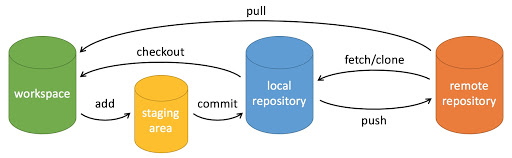
初始化本地git仓库
1
2
3
4
| git init
git add .
git commit -m 'git init'
git push
|
创建分支
1
2
3
4
5
6
7
8
9
10
11
| ## 新建分支并切换
git checkout -b <branchName>
git switch -c <branchName>
## 仅切换分支
git checkout <branchName>
git switch <branchName>
## 修改分支名称
git branch -m <new branchName>
git branch -m <old branchName> <new branchName>
|
查看分支
1
2
3
4
5
6
| ## 查看本地分支
git branch
## 查看远程分支
git branch -r
## 查看所有分支
git branch -a
|
删除分支
1
2
3
4
| ## 删除本地分支
git branch -d <branchName>
## 删除远程分支
git branch -dr <remote/branchName>
|
提交内容以及回退
1
2
3
4
5
6
7
8
9
10
11
12
13
14
15
16
17
18
19
20
| ## 将工作区的修改丢弃
git restore <file>
## 将工作区的修改内容保存到暂存区
git add <file>
## 删除工作区的文件并保存到暂存区
git rm <file>
## 将提交到暂存区的内容unstage
git restore --stage <file>
## 将暂存区的内容提交到本地库
git commit -m "message"
## 将本地库的提交回退
git reset --hard head^ #本地库回退到上一个版本,完全丢弃上一个版本的提交记录
git reset --soft head^ #本地库回退到上一个版本,保留上一个版本的改动记录到暂存区
git reset --mixed head^ #本地库回退到上一个版本,保留上一个版本的改动记录到工作区
git reset --hard <log id> #本地库回退到指定版本,完全丢弃之前版本的提交记录
|
查看提交记录日志
1
2
3
4
5
| ## 查看详细日志
git log
## 查看简要日志
git log --pretty=oneline
|
分支合并
1
| git merge/rebase <branchName> ##将其他分支合并到当前分支
|
其他